Crypto payments were checked by hand. Nebulox made it automatic.

A crypto payment gateway that replaced manual, screenshot-based payment checks for two internal products: a cross-border payment service and a crypto exchange.

Transfer14:32
Sent 250.00 USDT ≈ $250.00
To
TQ7x…9fK2
Network
TRON (TRC20)
Network fee
1.00 USDT
Tx hash
7f3a…c91e
Screenshot ≠ proofcan be incomplete, or fake
Illustrative transfer screen · sample data
My role
Product Designer
Research, testing, UX/UI, design-system components
Team
1 design lead, 2 designers, 1 PM, 6 engineers
Timeline
~1 year, zero to launch
Outcome
Both internal products migrated; ready for external merchants

The problem

Payments were verified by eye

  1. Ali at his laptop opening a support ticket, coins in his speech bubble
    01

    Ali opens a support ticket to pay in crypto.

  2. Sara at her desk typing into a ticket, next to a tall stack of tickets
    02

    Sara types the address and amount into it by hand.

  3. Ali looking at his phone, unsure which network path to choose
    03

    Ali copies the address and guesses the network.

  4. Ali taking a screenshot of his phone as proof
    04

    He pays and uploads a screenshot as proof.

  5. Sara holding a magnifying glass between a phone screenshot and a wallet
    05

    Sara compares the screenshot with the wallet by eye.

  6. A tall pile of tickets and a clock, one ticket slipping out
    06

    Tickets pile up, and Ali’s request slips down the queue.

  7. Ali frowning at his phone, waiting, with a clock nearby
    07

    Hours later, Ali still doesn’t know if it arrived.

  8. Sara worried at a monitor showing a red warning triangle
    08

    A wrong network or amount, and the business pays for it.

Discovery

The people doing the checks knew where it broke

The brief came from the business. To see what it didn’t say, I spent time with the product managers of both products and with the ops team who checked payments every day. In short, this is what they told me:

A screenshot can be incomplete, or fake. And the mistake we see most is the wrong network.
Check, approve, then act. Miss one ticket and the customer just waits.
Mistakes come from our side too: a wrong address, a wrong amount. Some of them cost us money.

Three members of the ops team: one thoughtful with a headset, one with arms crossed, one explaining with a raised hand.
The ops team who checked payments every day · quotes are paraphrased summaries

The insight

The hard part wasn’t sending crypto. It was proving it arrived.

Now the problem was clear, and so was the job. Nebulox had to prove payments on its own, and help people avoid the mistakes no system can undo afterwards.

How Nebulox proves a payment

  1. 01

    Each invoice gets its own address and amount

  2. 02

    The customer pays

  3. 03

    The payment is detected on-chain

  4. 04

    The status updates by itself

Invoice list: new invoices from the gateway and manual invoices appear, and their status changes on its own from Pending to Partial, Paid or Expired.

Who it’s for

So Nebulox had to earn the trust of three people

A freelancer at her laptop, unsure, thinking about an invoice and coins

The freelancer

Has no website. Sends an invoice link to get paid.

How do I ask for crypto without getting it wrong?

Answered in: Invoice form
A young man about to send a payment from his phone, wondering if it will arrive

The payer

Often paying a business in crypto for the first time. Never creates an account.

Will my payment arrive safely?

Answered in: Payment screen

Built from conversations with the ops and product teams of both products.

Decision 01 · The freelancer

Freelancers needed invoices that say exactly what they accept

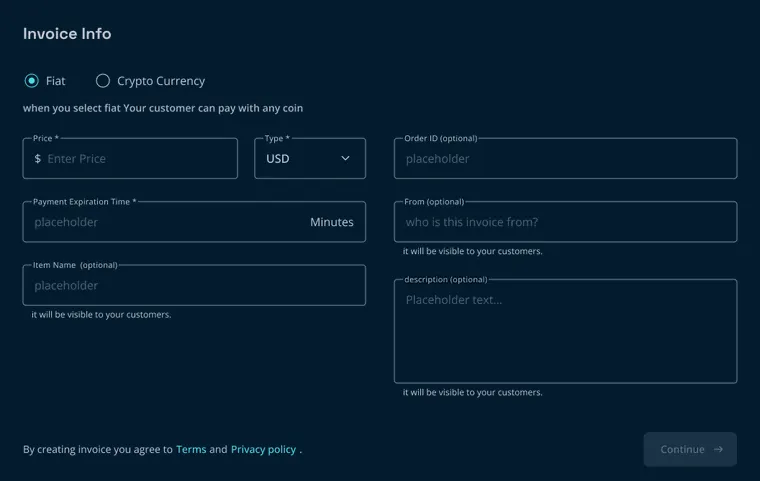
A freelancer without a website gets paid with an invoice link. They want it quick, but one wrong choice sends their customer the wrong request. So the form had to be fast and hard to get wrong. I tested four versions with colleagues acting as freelancers, our team lead, engineers and PMs, and checked each against four questions:

  1. Q1Can they finish it?
  2. Q2Do they understand every field?
  3. Q3Do they know what their customer will pay?
  4. Q4Is the invoice what they intended?
Each version is scored on Q1–Q4:✓ yes◐ partly✕ no
05 · Decision 01 · Four tested versions2 / 4
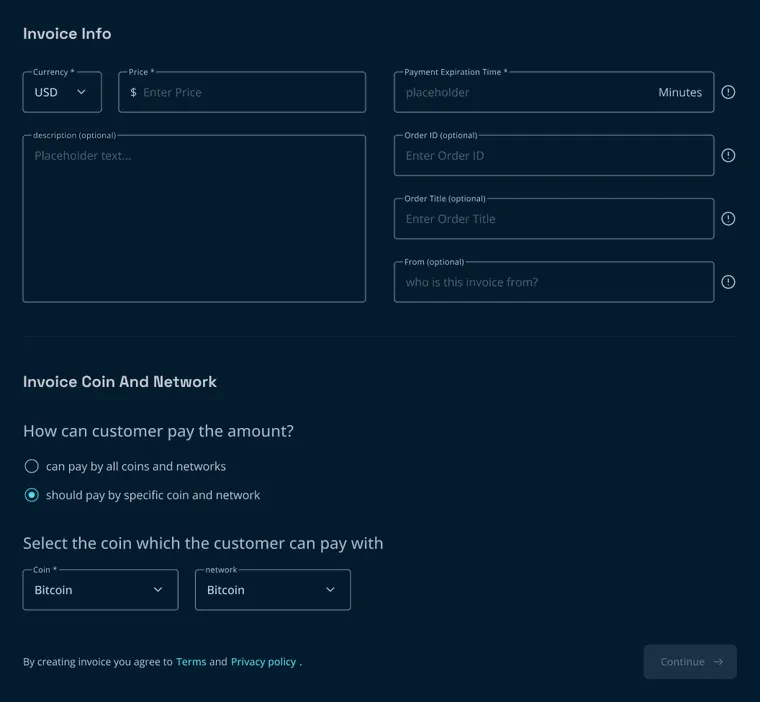
V1 create-invoice form

VERSION 1

Everything on one page

  • Q1 ✕
  • Q2 ✕
  • Q3 ✓
  • Q4 ◐

What broke

  • One long page.
  • Order ID unclear.
  • The invoice could expire before the payment confirmed.
  • An optional field took the most space.
  • “Order title” and “From” unclear.
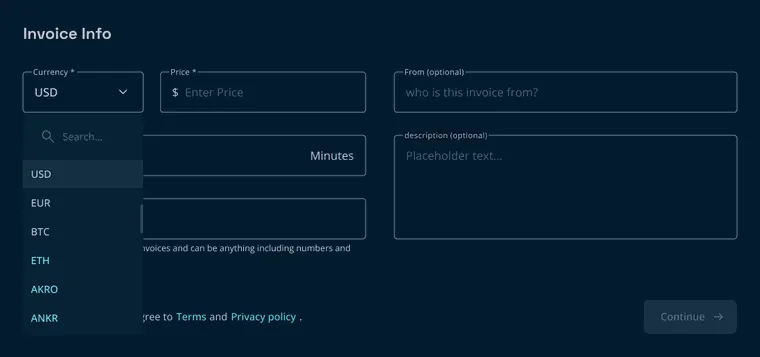
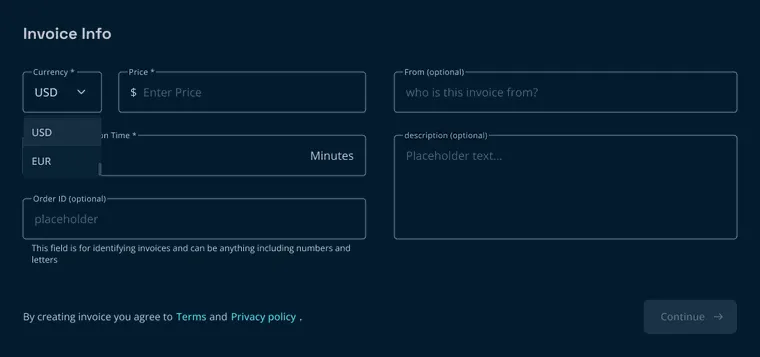
V2 create-invoice form

VERSION 2

Simpler, by merging two decisions

  • Q1 ✓
  • Q2 ◐
  • Q3 ✕
  • Q4 ◐

What I changed

  • Help text for Order ID.
  • A hint inside the From field.
  • Description no longer first.
  • Price currency and accepted coin merged into one field.

What broke

  • Couldn’t price in dollars and be paid in one specific coin.
  • Dollars, euros and every coin mixed in one long dropdown.
  • Picking USD silently meant “any coin”.
05 · Decision 01 · Four tested versions3 / 4
V3 create-invoice form, step 1 V3 create-invoice form, step 2

VERSION 3

The two decisions apart again

  • Q1 ✓
  • Q2 ◐
  • Q3 ✓
  • Q4 ◐

What I changed

  • Two steps instead of one page.
  • Step 1: price in dollars or euros only.
  • Step 2: how the customer pays, any coin or one specific coin.

Result

5 of 5 testers preferred it to V1.

What broke

  • “From” and “Order ID” still unclear.
  • No way to price in crypto.
  • Expiry set before choosing the network.
V4 create-invoice form

VERSION 4

Invoicing in crypto, too

  • Q1 ◐
  • Q2 ◐
  • Q3 ✕
  • Q4 ◐

What I changed

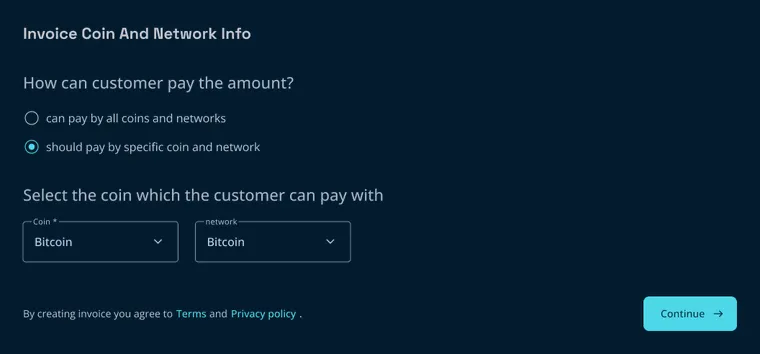
  • A Fiat / Crypto choice at the top, so prices could be set in crypto.
  • “Order title” renamed to “Item name”.
  • “Visible to your customers” under the fields the customer sees.

What broke

  • Most testers didn’t notice the Fiat / Crypto choice.
  • Those who did couldn’t tell Fiat from Crypto.
  • Fiat once again meant “any coin”.
  • Back to one long page.
05 · Decision 01 · Shipped4 / 4
Prototype: create an invoice in three steps, review it, and share the link
Shipped

V3’s structure, without V4’s jargon or V2’s shortcut

Evidence

I took the test results to the ops team who knew freelancers best. Most freelancers wanted to be paid in fiat and rarely needed to price in a coin.

What I changed

  • Fiat only in step 1, for this phase.
  • Payment options in their own step: any coin, or one coin and network.
  • Expiry set per network in Settings, not guessed in the form.
  • Optional fields last, each with a tooltip.
  • Kept from V1: the review step before creating.
  • Q1 ✓
  • Q2 ✓
  • Q3 ✓
  • Q4 ✓

Decision 02 · The payer

Payers needed to see their payment arrive

Every customer lands on the same checkout, from a freelancer’s link or a business’s website. Many have never paid in crypto before, so I designed it around three rules:

  1. 1 · Simple, familiar steps

    One decision per screen: pick a coin, pick a network, send.

  2. 2 · Hard to get wrong

    The wrong network was the most common mistake, and it can’t be undone. So the network gets its own step, with a warning that names the only network that works.

  3. 3 · A clear answer

    Each invoice has its own address and amount, so Nebulox matches the payment itself. The customer no longer sends a screenshot as proof. The screen updates on its own:

    Waiting for paymentConfirmingPaid & confirmed
Checkout prototype: choose a coin, then a network, send to the invoice address, then confirming and paid.

Decision 03 · The business

Businesses needed to trust Nebulox with their money

A business handing its income to a new provider like Nebulox wants to stay in control. The gateway gives it three options:

  • Notifications, so it knows when a payment arrives.

  • A webhook, so its own system knows too.

  • Automatic withdrawal, so its money doesn’t have to stay in Nebulox.

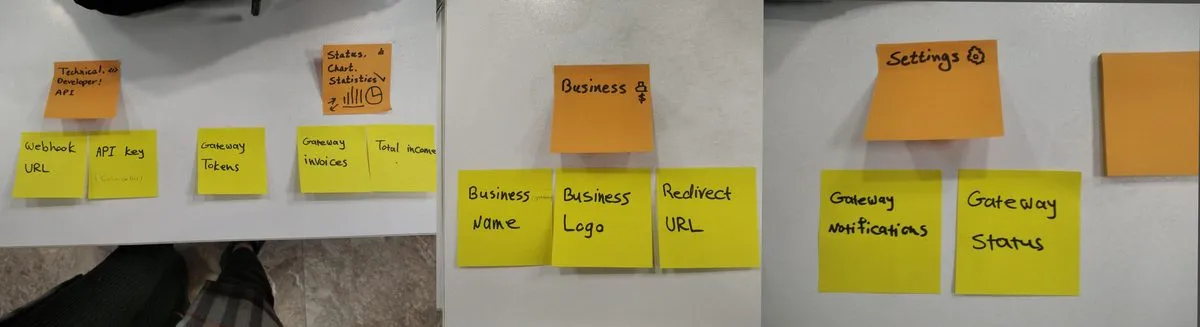
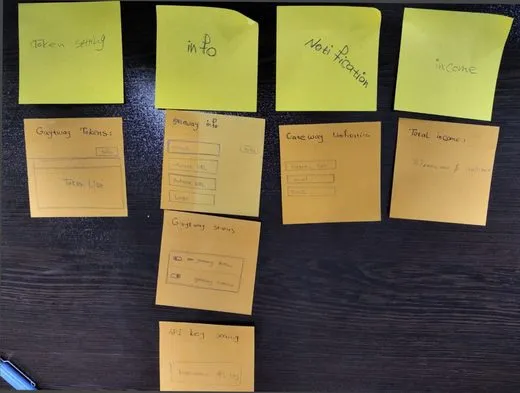
With so many settings, some were easy to miss. I ran a card sort with both products’ PMs and two ops staff, designed each person’s grouping, and we settled on three tabs: General, Technical and Notifications.
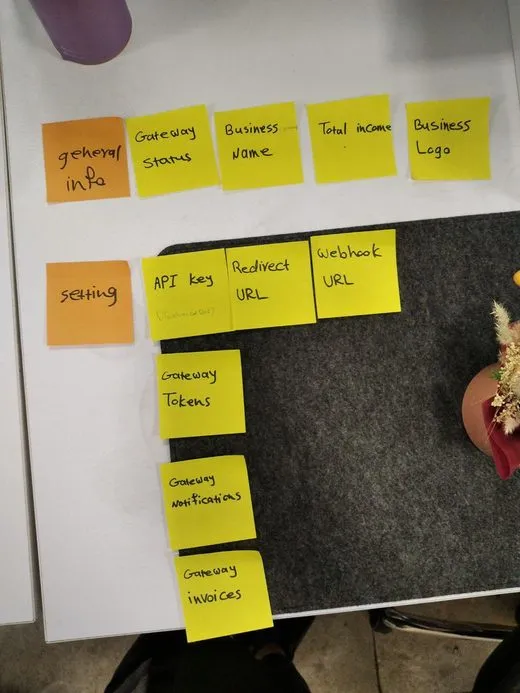
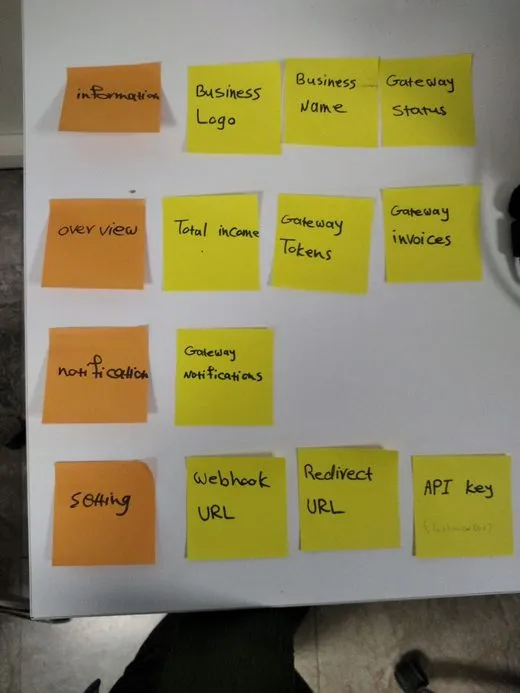
Card sort, participant 1
Participant 1
Card sort, participant 2
Participant 2
Card sort, participant 3
Participant 3
Card sort, participant 4
Participant 4
07 · Decision 03 · The result2 / 4
The result: three tabs, General, Technical and Notifications
07 · Decision 03 · Automatic withdrawal3 / 4

Then automatic withdrawal broke the books

  1. 01The problem

    Which business does this withdrawal come out of? A company running several businesses shared one wallet across all its gateways.

  2. 02The research

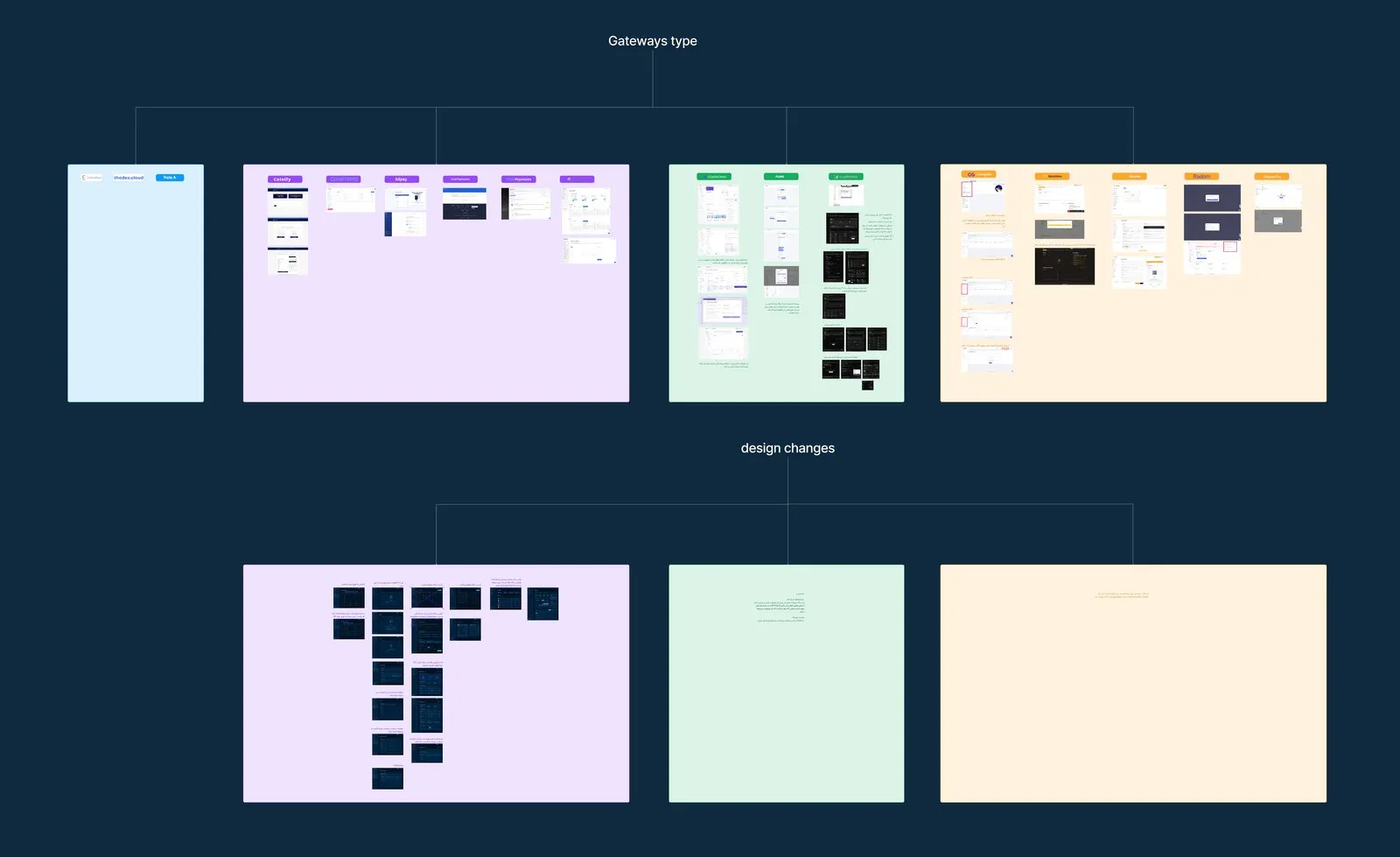
    I mapped 14 benchmarked gateways into three models, each with its limits and what it would change in our design.

Benchmark board: gateways grouped into three wallet models, with the design changes each one would need
The benchmark board: gateways grouped by model (top), and what each model would change in our design (bottom)
07 · Decision 03 · The call4 / 4

Three wallet models

Chosen

One business, one wallet

Coinify · Confirmo · BitPay · CoinPayments · NOWPayments · Request

Limit:
a company needs one account per business.
Design:
no gateway list; per-gateway numbers go.

Many businesses, one wallet

CryptoCloud · Plisio · Cryptomus

Limit:
our model. One withdrawal can drain every business’s balance, and income can’t be split by business.
Design:
stats can’t be shown at all.

Many businesses, many wallets

CoinGate · BlockBee · CoinRemitter · Radom · Calypso Pay

Limit:
the most engineering work.
Design:
an account switcher, and every setting changes on switch.
  1. 03My recommendation

    One business, one wallet, and the team agreed. It was an MVP, time was short, and there was no reason to solve a complexity we didn’t yet know anyone needed.

  2. 04Shipping fast

    Money was involved, so I agreed with the developers to remove the gateway list for now and leave the redesign for later.

Outcome

Both products stopped checking payments by hand

  1. Both products moved over

    The cross-border payment service and the crypto exchange now take crypto payments through Nebulox.

  2. No more screenshot checks

    Payments are matched to their invoice automatically. Nobody checks screenshots against wallets by hand anymore.

  3. Ready for outside merchants

    The product was feature-complete for external businesses, with a few trial users when I left.

What I can’t show

There’s no before-and-after number: the manual process was never measured, and I’m not going to make one up. What I can point to is the bar set at the start, and that it was met.

Reflection

What I’d do differently

01Show the freelancer what their customer will see

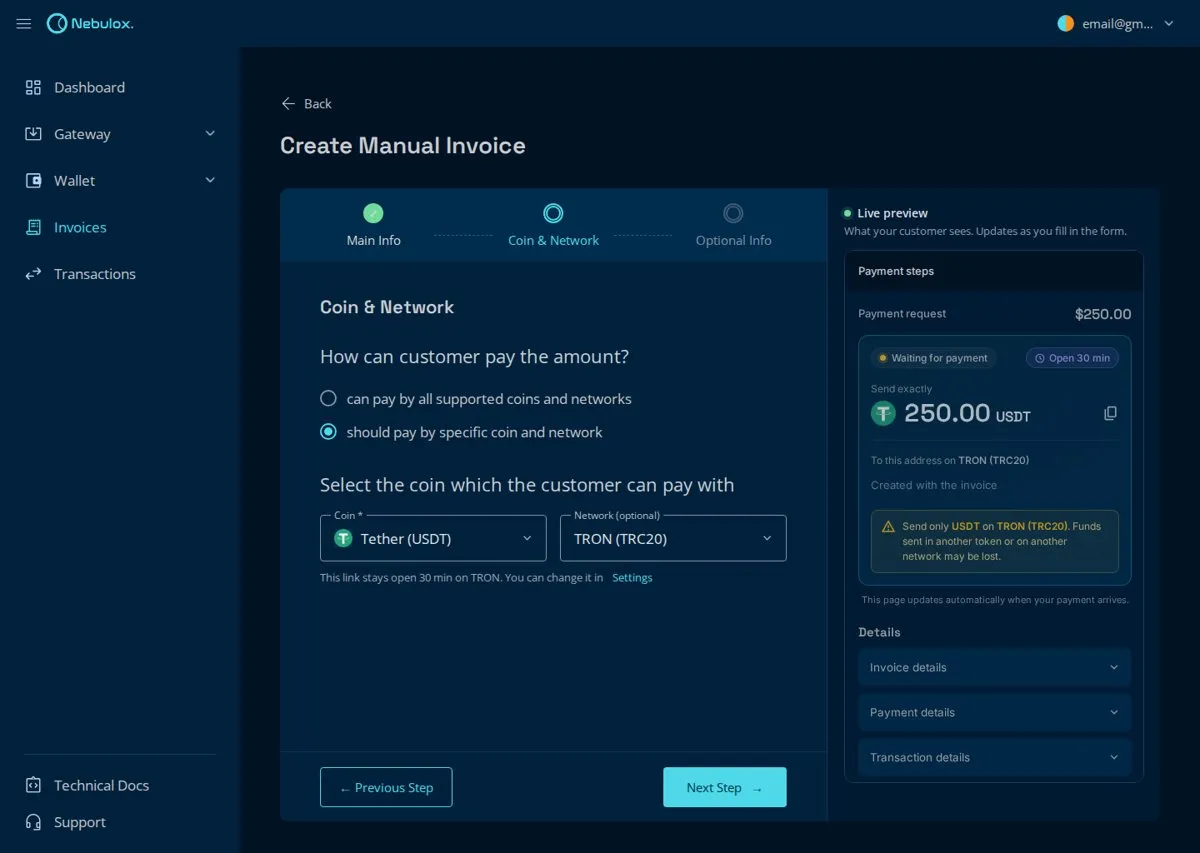
After launch, the team’s feedback pointed to one change in the invoice form: a live preview of the exact checkout, beside the form, updating as the freelancer fills it in. It would replace the review step.

Concept: the invoice form with a live preview of the customer's checkout beside it Concept · not shipped
A concept, not the shipped design: the invoice form with a live preview of the checkout
09 · Reflection2 / 2

02Benchmark with a sharper question

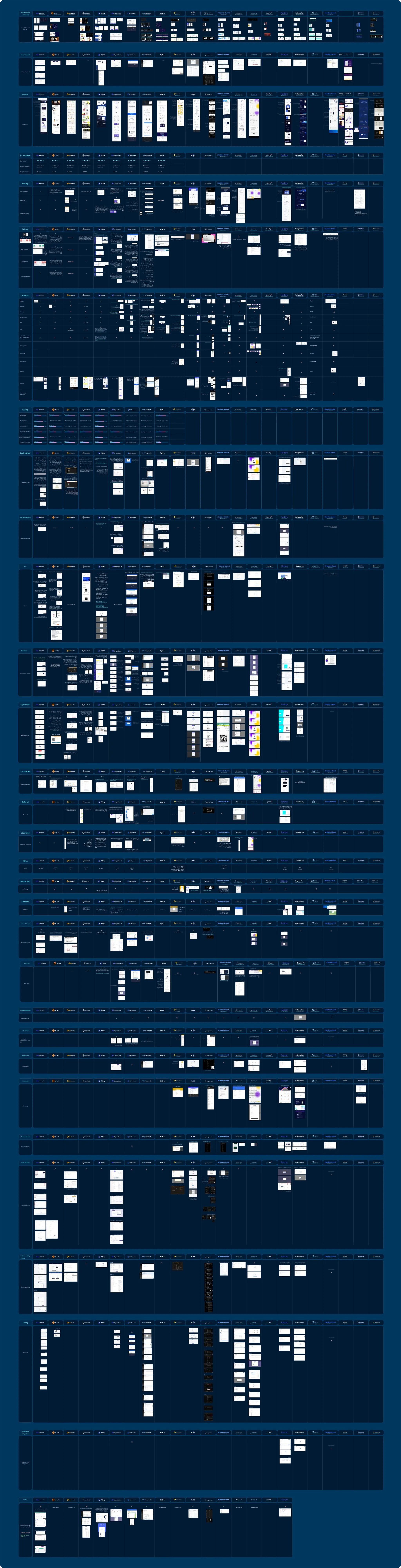
I compared about 20 gateways on 35 features; scroll the board to see how far it went. Some of those rows never informed a decision, and starting from the decision would have made the benchmark faster.

The full benchmark board: about 20 gateways compared side by side, feature by feature
Scroll inside the board

03Talk to people outside the company earlier

Almost everything I learned came through the ops and product teams. A few sessions with outside freelancers and developers would have shown whether those patterns held beyond our own products.

Crypto payments were checked by hand. Nebulox made it automatic.

A crypto payment gateway that replaced manual, screenshot-based payment checks for two internal products: a cross-border payment service and a crypto exchange.

TRANSFER · 14:32Sent

250.00 USDT

≈ $250.00

To
TQ7x…9fK2
Network
TRON (TRC20)
Tx hash
7f3a…c91e
Screenshot ≠ proof
can be incomplete, or fake
Illustrative transfer screen · sample data
My role
Product Designer
Research, testing, UX/UI, design-system components
Team
1 design lead, 2 designers, 1 PM, 6 engineers
Timeline
~1 year
Zero to launch
Status
Shipped, in use
2Internal products migrated
Payment service and crypto exchange
0Payments checked by hand
Matched to their invoice automatically
~1yZero to launch
Ready for external merchants

The problem

Payments were verified by eye

One crypto payment, before Nebulox
Swipe · 8
Ali at his laptop opening a support ticket, coins in his speech bubble
01

Ali opens a support ticket to pay in crypto.

Sara at her desk typing into a ticket, next to a tall stack of tickets
02

Sara types the address and amount into it by hand.

Ali looking at his phone, unsure which network path to choose
03

Ali copies the address and guesses the network.

Ali taking a screenshot of his phone as proof
04

He pays and uploads a screenshot as proof.

Sara holding a magnifying glass between a phone screenshot and a wallet
05

Sara compares the screenshot with the wallet by eye.

A tall pile of tickets and a clock, one ticket slipping out
06

Tickets pile up, and Ali’s request slips down the queue.

Ali frowning at his phone, waiting, with a clock nearby
07

Hours later, Ali still doesn’t know if it arrived.

Sara worried at a monitor showing a red warning triangle
08

A wrong network or amount, and the business pays for it.

Discovery

The people doing the checks knew where it broke

The brief came from the business. To see what it didn’t say, I spent time with the product managers of both products and with the ops team who checked payments every day.

Screenshots can be incomplete, or fake
Miss one ticket and the customer waits
Our mistakes cost money too
Three members of the ops team: one thoughtful with a headset, one with arms crossed, one explaining with a raised hand.

The ops team who checked payments every day · quotes are paraphrased summaries

The insight

The hard part wasn’t sending crypto. It was proving it arrived.

Nebulox had to prove payments on its own, and help people avoid the mistakes no system can undo afterwards.

How Nebulox proves a payment
01Each invoice gets its own address and amount
02The customer pays
03The payment is detected on-chain
04The status updates by itself

Invoice list: statuses change on their own from Pending to Partial, Paid or Expired.

Who it’s for

So Nebulox had to earn the trust of three people

Three people, three questions
Swipe · 3
A freelancer at her laptop, unsure, thinking about an invoice and coins

The freelancer

Has no website. Sends an invoice link to get paid.

“How do I ask for crypto without getting it wrong?”

Invoice form · Decision 01
A young man about to send a payment from his phone, wondering if it will arrive

The payer

Often paying a business in crypto for the first time. Never creates an account.

“Will my payment arrive safely?”

Payment screen · Decision 02
A business owner looking at a chart, thinking about whether the numbers are right

The business

Connects its site to Nebulox and runs on what the panel reports.

“Can I trust Nebulox with my money?”

Gateway settings · Decision 03

Built from conversations with the ops and product teams of both products.

Decision 01 · The freelancer

Freelancers needed invoices that say exactly what they accept

A freelancer without a website gets paid with an invoice link. One wrong choice sends their customer the wrong request, so the form had to be fast and hard to get wrong. I tested four versions with colleagues acting as freelancers, our team lead, engineers and PMs, against four questions:

Q1Can they finish it?
Q2Do they understand every field?
Q3Do they know what their customer will pay?
Q4Is the invoice what they intended?
Four tested versions
Swipe · 4
✓ yes◐ partly✕ no
V1 create-invoice form
Version 1

Everything on one page

Q1✕Q2✕Q3✓Q4◐

What broke

  • One long page.
  • Order ID unclear.
  • The invoice could expire before the payment confirmed.
  • An optional field took the most space.
  • “Order title” and “From” unclear.
V2 create-invoice form
Version 2

Simpler, by merging two decisions

Q1✓Q2◐Q3✕Q4◐

What I changed

  • Help text for Order ID.
  • A hint inside the From field.
  • Description no longer first.
  • Price currency and accepted coin merged into one field.

What broke

  • Couldn’t price in dollars and be paid in one specific coin.
  • Dollars, euros and every coin mixed in one long dropdown.
  • Picking USD silently meant “any coin”.
V3 create-invoice form, step 1 V3 create-invoice form, step 2
Version 3

The two decisions apart again

Q1✓Q2◐Q3✓Q4◐

What I changed

  • Two steps instead of one page.
  • Step 1: price in dollars or euros only.
  • Step 2: how the customer pays, any coin or one specific coin.

5 of 5 testers preferred it to V1.

What broke

  • “From” and “Order ID” still unclear.
  • No way to price in crypto.
  • Expiry set before choosing the network.
V4 create-invoice form
Version 4

Invoicing in crypto, too

Q1◐Q2◐Q3✕Q4◐

What I changed

  • A Fiat / Crypto choice at the top, so prices could be set in crypto.
  • “Order title” renamed to “Item name”.
  • “Visible to your customers” under the fields the customer sees.

What broke

  • Most testers didn’t notice the Fiat / Crypto choice.
  • Those who did couldn’t tell Fiat from Crypto.
  • Fiat once again meant “any coin”.
  • Back to one long page.
Shipped

V3’s structure, without V4’s jargon or V2’s shortcut

Prototype: create an invoice in three steps, review it, and share the link

Evidence

I took the test results to the ops team who knew freelancers best. Most freelancers wanted to be paid in fiat and rarely needed to price in a coin.

What I changed

  • Fiat only in step 1, for this phase.
  • Payment options in their own step: any coin, or one coin and network.
  • Expiry set per network in Settings, not guessed in the form.
  • Optional fields last, each with a tooltip.
  • Kept from V1: the review step before creating.
Q1✓Q2✓Q3✓Q4✓

Decision 02 · The payer

Payers needed to see their payment arrive

Every customer lands on the same checkout, from a freelancer’s link or a business’s website. Many have never paid in crypto before, so I designed it around three rules:

1

Simple, familiar steps

One decision per screen: pick a coin, pick a network, send.

2

Hard to get wrong

The wrong network was the most common mistake, and it can’t be undone. So the network gets its own step, with a warning that names the only network that works.

3

A clear answer

Each invoice has its own address and amount, so Nebulox matches the payment itself. The customer no longer sends a screenshot as proof.

Waiting for paymentConfirmingPaid & confirmed

Checkout prototype: coin, network, send, then confirming and paid.

Decision 03 · The business

Businesses needed to trust Nebulox with their money

A business handing its income to a new provider wants to stay in control. The gateway gives it three options:

Notifications, so it knows when a payment arrives.

A webhook, so its own system knows too.

Automatic withdrawal, so its money doesn’t have to stay in Nebulox.

With so many settings, some were easy to miss. I ran a card sort with both products’ PMs and two ops staff, designed each person’s grouping, and we settled on three tabs: General, Technical and Notifications.
Card sort
Swipe · 4
Card sort, participant 1
Participant 1
Card sort, participant 2
Participant 2
Card sort, participant 3
Participant 3
Card sort, participant 4
Participant 4

The result: three tabs, General, Technical and Notifications

Then automatic withdrawal broke the books

  1. 01The problem

    Which business does this withdrawal come out of? A company running several businesses shared one wallet across all its gateways.

  2. 02The research

    I mapped 14 benchmarked gateways into three models, each with its limits and what it would change in our design.
    Benchmark board: gateways grouped into three wallet models, with the design changes each one would need
    Gateways grouped by model (top), and what each would change in our design (bottom)
Three wallet models
Swipe · 3
Chosen

One business, one wallet

Coinify · Confirmo · BitPay · CoinPayments · NOWPayments · Request

Limit:
a company needs one account per business.
Design:
no gateway list; per-gateway numbers go.

Many businesses, one wallet

CryptoCloud · Plisio · Cryptomus

Limit:
our model. One withdrawal can drain every business’s balance, and income can’t be split by business.
Design:
stats can’t be shown at all.

Many businesses, many wallets

CoinGate · BlockBee · CoinRemitter · Radom · Calypso Pay

Limit:
the most engineering work.
Design:
an account switcher, and every setting changes on switch.
  1. 03My recommendation

    One business, one wallet, and the team agreed. It was an MVP, time was short, and there was no reason to solve a complexity we didn’t yet know anyone needed.

  2. 04Shipping fast

    Money was involved, so I agreed with the developers to remove the gateway list for now and leave the redesign for later.

Outcome

Both products stopped checking payments by hand

Both products moved over

The cross-border payment service and the crypto exchange now take crypto payments through Nebulox.

No more screenshot checks

Payments are matched to their invoice automatically. Nobody checks screenshots against wallets by hand anymore.

Ready for outside merchants

The product was feature-complete for external businesses, with a few trial users when I left.

Reflection

What I’d do differently

  1. 01Show the freelancer what their customer will see

    After launch, the team’s feedback pointed to one change in the invoice form: a live preview of the exact checkout, beside the form, updating as the freelancer fills it in. It would replace the review step.

    Concept: the invoice form with a live preview of the customer's checkout beside it Concept · not shipped
  2. 02Benchmark with a sharper question

    I compared about 20 gateways on 35 features. Some of those rows never informed a decision, and starting from the decision would have made the benchmark faster.
    The full benchmark board: about 20 gateways compared side by side, feature by feature
    Scroll inside the board
  3. 03Talk to people outside the company earlier

    Almost everything I learned came through the ops and product teams. A few sessions with outside freelancers and developers would have shown whether those patterns held beyond our own products.